










Recording and Recreating Pedalboard Tones: Demos and Tips

Recording and Recreating Pedalboard Tones: Demos and Tips
Pedalboards have become one of the most expressive tools in a guitarist's arsenal. The way a handful of pedals interacts with your guitar, your picking dynamics, and your amp or cabinet can yield a vast spectrum of tones-from chimey clean to arresting distortion, from vintage grit to modern high gain. Capturing those tones in a recording or faithfully recreating them in a mix can feel like a moving target. The good news is that with a clear plan, the right signals, and a few practical tricks, you can both document your pedalboard's voice for demos and translate it into recordings that sit well in a track. This guide walks you through the essentials, from the signal chain to the final mix, with concrete steps and real-world tips you can apply today.
Understanding Your Pedalboard Tone
"Tone" is a blend of several interacting factors: gain structure, EQ, dynamics, transient response, and the nonlinear quirks of your pedals and amp. Pedals don't just add gain or delay; they sculpt the midrange, sustain, and attack of your signal. A single pedal in a chain can be felt in the way it makes notes ring, how it responds to pick attack, and how it behaves when you roll back your volume knob. When you move pedals around or add a new pedal, you're not just changing the effect-the entire frequency balance and dynamic response of your chain can shift.
Two key ideas help you approach tone with intention. First, treat the pedalboard as a single tonal system. The order of effects matters as much as the individual pedals themselves; a wah before dirt will feel very different from dirt before a wah. Second, know what you want to emphasize. Do you want glassy clean with sparse modulation, or do you crave a tight, high-gain lead tone with a solid midrange presence? Having a target helps you set up your board with repeatable cues that translate to a recording.
Direct Recording, Amp Miking, and Hybrid Approaches
There are several pathways to recording pedalboard tones, and each has its own strengths for demos and finished tracks:
- Direct capture (DI) from the guitar after your pedalboard into an audio interface. This yields a clean slate you can re-amp or re-model later. It's ideal for preserving dynamics and tonal fidelity.
- Amp-miked capture. A mic on a speaker cabinet can capture the power, room ambience, and the interaction between the amp head and the cabinet that are hard to simulate with software alone. It's the classic route for rock and metal tones, or any time you want a "live-in-a-room" feel.
- Hybrid. You record a DI to preserve the core tone and then re-amp through your real amp with a mic, or use impulse responses (IRs) of cabinets to simulate the cabinet/room, or run a modeled amp/speaker plug-in alongside the DI for blending. Hybrid approaches are extremely flexible for demos and final mixes alike.
For demos, a hybrid approach often works best: capture a clean DI of your pedalboard for maximum re-amping flexibility, and simultaneously record a mic'd amp or a high-quality simulator chain to illustrate how your live tone translates in a band context. In a studio, you may rely more on IRs and amp sims to speed up the workflow while keeping the tonal character intact.
Signal Chain Essentials: Pedal Order and Its Impact
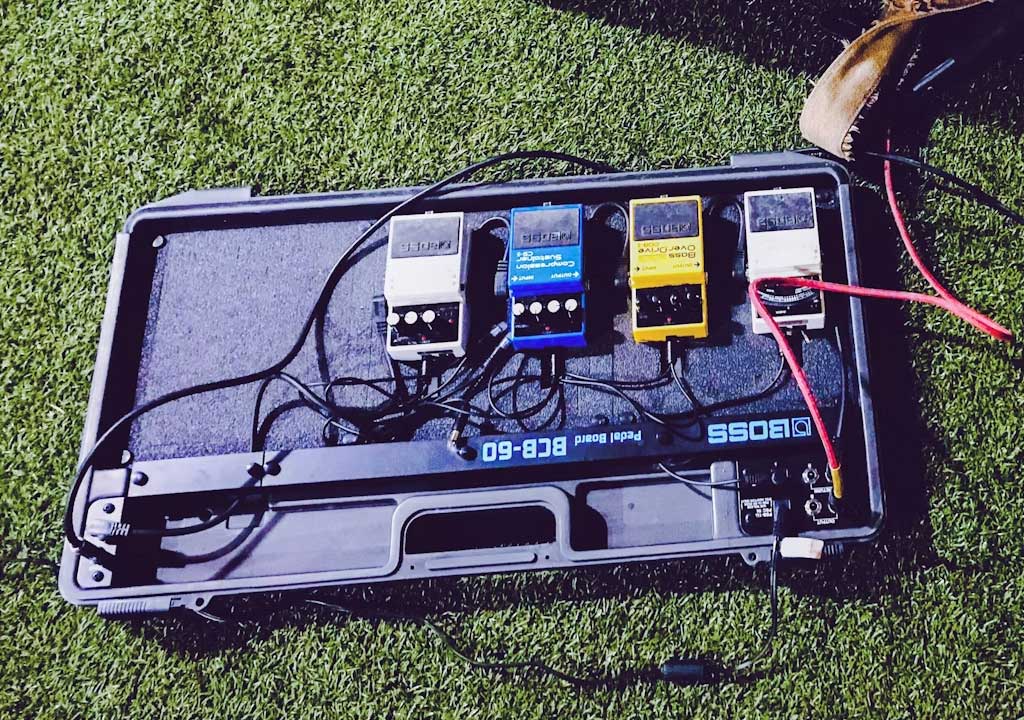
The way you arrange your pedals drastically affects your tone. Classic orders-tuner > buffer > drive > filter > modulation > time-based effects > amp in the chain-are common, but there's no universal "right." The important thing is to understand what each section does to your signal:
- Tuner and buffer: A tuner helps all your pedals track accurately, and a buffer preserves signal integrity when you have long cables or a lot of true-bypass pedals in the chain. If your board sounds thin or anemic when you plug in, a clean buffer at the start or near the end of the chain can help.
- Gain pedals (overdrive, distortion, fuzz): These shape harmonic content and dynamics. The order between them matters for how they interact. A mild overdrive first can push a later distortion differently than a fuzz after a transparent overdrive.
- Filters and modulation: Wah, phasers, choruses, flangers-these sculpt midrange and space. Placing modulation after gain pedals preserves the effect's character while still letting the gain stage define the core tone.
- Time-based effects: Delays and reverbs typically live after the gain and modulation so your repeats stay audible and the ambient space sits behind the core tone. In live rigs or certain experimental setups, some players insert delays before dirt to create self-oscillating textures, but this is a taste issue rather than a rule.
When recording, consider two paths. Path A: capture your "real-world" chain in the order you use live. Path B: build a more studio-friendly chain for DI capture, keeping the core tone intact while simplifying extrapolation in the mix. If you're re-amping later, you can record the pedalboard in a compact, repeatable way that's easy to route through a re-amp box and back into your amp or simulator.
Tools of the Trade: Gear and Room Setup
What you need to capture pedalboard tones effectively includes both signal path gear and a well-tuned environment. Here's a practical checklist:
- Guitar and pickups: The most obvious variable. Single-coil vs humbucker, coil-tapping, and even the guitar's scale length influence the tone you'll dial in with your pedals.
- Pedalboard and power supply: Ensure your pedals are powered cleanly and consistently. Noisy or sagging power can steal headroom and alter dynamics.
- Buffer or true-bypass considerations: If your board is mostly true-bypass, a buffer at the start of the path helps maintain level and tone when you introduce many pedals with long cables or multi-pedal loops.
- DI box or load box: For DI capture, a robust DI box with good impedance matching preserves your tone onto the interface. If you plan to drive an amp later, a load box with speaker-emulation can be useful for silent recording.
- Audio interface with adequate headroom: Look for a clean preamp with low noise and high headroom. 24-bit depth and a 44.1/48/96 kHz sample rate are standard options; higher sample rates can help with subtle high-frequency detail in room mics and reverb tails.
- Mic selection and placement: A dynamic mic (like a Shure SM57) on a guitar cabinet is a reliable starting point. A ribbon mic or a large-diaphragm condenser can add warmth or air if you're going for a brighter tone. Mic placement matters: start at a speaker's dust cap height, then move back a few inches to adjust brightness and room interaction.
- Reamping and IR gear: If you plan to re-amp or use impulse responses, stock up on a good reamping box and a trusted IR loader. Consistency in input/output levels is key to repeatable results.
- Treatment and room: A reasonably dead room with a touch of shelf reflection or a few absorbent panels helps avoid excessive slapback in DI recordings and reduces room-mode coloration in close-mic recordings. For demos, a touch of room ambience can be desirable, but it should be controllable.
Step-by-Step: Recording Your Pedalboard Tones
Below is a practical workflow you can adapt to your setup. It's designed to be repeatable for demos, while still offering the flexibility needed for expressive playing.
1) Define the tone you want to capture. Decide which pedal or chain should be the focus and what the end-use of the recording will be (demo video, album track, or backing track).
2) Choose your capture path. For maximum flexibility, record a DI of the guitar after the pedalboard. If you're chasing an amp-in-the-room vibe, also set up one mic on the cabinet and consider a room mic for ambience.
3) Establish a baseline with a clean signal. Bypass or turn down most effects, keeping a simple signal path (guitar > buffer > DI). This baseline helps you measure how pedals alter the tone later.
4) Insert pedals in your chosen order. If you're testing a new pedal, place it where you expect it to influence the tone the most, and record a short take to compare with and without it.
5) Set levels and gain staging. Aim for strong, non-clipping levels in the DAW, with meters peaking around -12 dBFS on the DAW track. For the amp mic path, keep the mic preamp clean but not underdriven.
6) Record the direct signal first. This is your "raw" tone; it's easier to re-amp or re-model later when you have a clean capture of the pedalboard's tonal fingerprint.
7) Add the amplifer or IR path. If you're using a real amp, position mics, adjust room, and capture several variations. If you're using an IR or amp-sim path, audition a few cabinet profiles to see which most closely matches your live tone.
8) Capture room and ambiance. A pair of room mics can give your demos a lifelike feel when you mix with the direct signal. Keep room mics at a distance and at a level that doesn't overshadow the primary signal.
9) Take notes. Record the pedal order, settings, guitar type, strings, pick gauge, and playing style for each take. This makes it possible to reproduce or adjust later without guesswork.
10) Review and compare. Listen back in context with a drum loop or a mix. Jot down what needs adjustment-the gain, the EQ balance, the presence, or the room's decay. Make targeted changes and re-record as needed.
Recreating Tones in the Mix: Tricks and Techniques
You've captured a great tone; now you need it to sit well in a mix. Recreating pedalboard tones in a track involves more than just duplicating a knob setting. It's about placing your sound in the sonic space and ensuring it remains expressive under a vocalist, bass, and drums, while maintaining intelligibility in the frequency spectrum.
- Use reference tracks. Bring a track you trust into your project and compare the tonality of your guitar. Pay attention to where the guitar sits in the spectrum, its perceived loudness, and how sustain translates in the mix. Let this guide your EQ, dynamics, and effects decisions.
- Tackle the low-end and low-mids first. A lot of "tone" in a dense mix lives in how you manage the low end. If your pedalboard is driving a heavy chorus of midrange grit, you might want to scoop or tame the low mids slightly to avoid masking the bass patch or other instruments.
- Re-create the dynamic feel. Pedals influence how notes respond to picking. In the mix, use light compression to even out dynamics without killing the note's transient. A touch of parallel compression on the guitar bus can preserve punch while keeping sustain in check.
- Space and ambience. Ambient effects like reverb and delay can wash out a tone if overused. For demos, you may want a more obvious plate or room to convey space. In a full mix, a subtle tail and a shorter pre-delay can help the tone remain clear while still sounding natural.
- Character through EQ. Use a surgical approach to re-create the pedal's midrange contour. If your pedal emphasizes the high-mid presence, you might use a gentle bell boost around 2-4 kHz or a peaking cut around 350-700 Hz to shape body. Every pedal chain is unique, so trust your ears rather than generic rules.
- Use the same reference track during editing. If you're matching a tone to a reference, make sure you're comparing apples to apples-same instrument, same DSP chain, and similar playing dynamics. If your reference track is in a different key or tempo, adjust accordingly before critical listening.
- Consider mic-bleed and phase. If you've layered multiple takes (DI + amp mic), phase alignment becomes critical. If something sounds hollow or out of phase when you blend tracks, nudge one track by a few samples to restore alignment.
Reamping and Flexibility: Keeping Your Options Open
Reamping is a powerful technique for dialing in a tone after you've captured a good core performance. It lets you explore several amplifiers, cabinets, and impulse responses without re-playing the take. Here's a practical approach:
- Record a clean DI of the guitar after the pedalboard. Keep the signal path consistent so you can reproduce the same feel with different gear later.
- Use a reamping box. A reamping box converts line-level signals to speaker-level signals with the appropriate impedance and headroom to drive an amp or pedalboard. This ensures your recorded part responds as if you were playing through your actual rig.
- Dial in an initial tone. Start with a straightforward amp model or a simple cabinet IR and test the re-amped signal with your pedalboard into the chain. Check if dynamics, attack, and sustain feel right before refining further.
- Iterate. Swap amps, cabs, IRs, or pedal order to see how each change affects the result. The beauty of reamping is that you can audition many tones quickly without re-recording the performance.
- Keep notes. Document the exact gear, settings, and chain for each tone you commit to the project. This makes future projects faster and reduces the guesswork.
Demos: Practical Breakdown
Here are a few practical demo scenarios you can try to illustrate how pedalboard tones translate from pedal to track. Each scenario suggests a recording plan, a tonal goal, and a quick workflow you can implement in a home studio or a professional setup.
Demo A - Modern High-Gain Lead Patch
- Tonal goal: A sustained, tight lead tone with aggressive mids and a controlled low end. Slightly scooped high end to keep strings from getting brittle in the mix, with a touch of brightness for attack.
- Recording plan: DI of the pedalboard plus a mic'd 57 on the cabinet. Also capture a room pair for ambience. Use a high-gain amp model or IR with a tight, compressed feel. Record a short lead line and a rhythm bed to show context.
- Tips: Focus on the midrange boost and the presence frequencies to cut through the mix. Compress the lead just enough to keep sustain consistent without blunting articulation. In the mix, keep the echo/reverb tail tight to avoid muddiness.
Demo B - Clean with Subtle Modulation
- Tonal goal: A glassy clean tone with shimmer from chorus or tremolo and a subtle touch of delay to create space.
- Recording plan: DI first, then a clean amp or IR with a bright character. Use a DI to capture the brightness without relying on mic position. Add a gentle stereo modulation in the mixer for width.
- Tips: Keep the gain low to preserve note clarity. In the mix, pan modulation effects slightly to separate them from the dry signal. A small amount of plate reverb can emphasize the space without washing the tone.
Demo C - Vintage-Style Crunch
- Tonal goal: A mid-forward crunch with harmonic richness, suitable for blues-rock or early-70s tones. A touch of octave up or down can alter character, so choose a patch with care.
- Recording plan: Use a pair of mics for cabinet capture and a DI for the pedalboard. Close-mic a mid-scoop cabinet for bite, and blend in a ribbon mic for warmth if available. Re-amp with a vintage-sounding amp model to compare with the real cabinet.
- Tips: Maintain a controlled pick attack to avoid flabby transients. In the mix, emphasize the mids with a gentle boost around 1-2 kHz if the tone feels dull in the band context.
Demo D - Ambient Pad with Delay and Reverb
- Tonal goal: A lush, ambient pad using long delays and spacey reverb with a subtle drive to keep things from sounding sterile.
- Recording plan: DI to capture the base tone, then stack long delays and a plate reverb in the mix. If possible, record a direct amp path in a separate track and layer with a clean IR-based cabinet to give a sense of space without overwhelming the pad.
- Tips: Use a slow attack on the delay to allow the pad to evolve. Keep the reverb tail in check so the guitar breathes rather than swallows the mix. In mastering, gentle automation of level and presence helps the pad shimmer at the right moments.
Tips, Tricks, and Common Pitfalls
To help you avoid common mistakes and achieve more consistent results, here are practical tips drawn from real-world sessions:
- Tip: Start with good fundamentals. A clean signal path, proper impedance matching, and stable levels are the foundation. If your tone sounds off, check the basics before tweaking the pedals.
- Tip: Use a reference session. Record a short take of a well-known song's guitar part and compare your tone to a commercial or reference track. This helps you evaluate how your tone sits in a mix and whether you're achieving the desired vibe.
- Tip: Don't over-quantize. Pedalboard tones are dynamic. If you're chasing a perfect, static tone, you'll lose the living feel of the performance. Keep a natural dynamic range while shaping the tone through EQ and compression in the mix.
- Pitfall: Over-processing. It's easy to chase "the perfect pedal" by stacking more effects. Resist the urge to solve every problem with more pedals; often a simpler path with better gain staging and EQ yields a cleaner, more musical result.
- Pitfall: Inconsistent room tone. Room ambience can vary drastically between takes. Use consistent mic placements, and if you're recording at different times, re-check the room balance and mic levels before committing to a take.
- Tip: Document settings. Keep a simple log of pedal settings, pedal order, guitar, strings, and pick gauge for each tone you record. This makes it much easier to reproduce or tweak later.
- Tip: Edits matter. In a demo, even small timing adjustments or tone tweaks can improve clarity. Slice the take where tension resolves, then rejoin to keep the performance tight while maintaining musical phrasing.
- Tip: Balance is a virtue. A great pedalboard tone can become dull if there's no space in the mix. Leave room for the bass and drums. If needed, carve EQ cuts on the guitar bus to avoid masking other instruments.
Practical Setup Checklist
Before you start a session, here's a compact checklist to keep you productive and focused:
- Decide the recording path: DI-only, mic on amp, or hybrid with IRs.
- Confirm gear stability: cables, power supply, and pedals are all working, with no unwanted noise or hum.
- Set baseline levels for the DI and the mic path. Ensure peaks stay under clipping and the DAW tracks have headroom.
- Choose your reference tone. Pick a target tone you want to emulate and use it as a yardstick during tweaks.
- Prepare the room and mic placement. Do a quick test to confirm you like the room's contributions without overwhelming the direct signal.
- Document the plan. Write down patch names, pedal order, and any specific settings. When you return, you'll know exactly what to reproduce or modify.
Putting It All Together: A Simple Demo Routine
A practical routine that many studios use to capture and recreate pedalboard tones goes like this:
1) Build a baseline DI with your pedalboard. Ensure your signal is clean and the level is strong but not clipping.
2) Record a short, representative phrase with the pedalboard engaged. Use your go-to pick and playing style so you can compare future takes.
3) Add the amp or its IR path. Place mics, or select the cabinet IR, and capture a second take. Note the mic position and cabinet profile so you can repeat it later if needed.
4) Record room ambience if desired. A pair of room mics gives your demos a sense of space and realism when blended with the direct and amp tracks.
5) Do a quick comparison with the reference tone. Adjust EQ, dynamics, and the effect level until you're satisfied with how the tone sits in the mix.
6) Save presets or project templates. A few well-documented presets make it faster to start a new session and maintain consistency across tones.
Final Thoughts: The Art and Science of Pedalboard Demos
Recording and recreating pedalboard tones is as much about art as it is about science. You're translating tactile, physical interactions-your pick attack, your pedal layout, your amp's response-into a digital representation that can be listened to, shared, and built upon. The process benefits from both a structured approach and creative experimentation. Use the steps outlined here as a framework, but allow yourself to explore new pedal orders, novel amp interactions, and unique room effects. The best demos and final mixes come from players who treat tone as a living, evolving element rather than a fixed target.
As you practice, you'll discover the subtle cues that make a tone feel "true" in a recording: the way the sustain decays, how the midrange breathes with dynamics, and how small changes in mic position or IR selection can dramatically shift the perceived character. With disciplined recording habits, careful gain staging, and thoughtful mixing, your pedalboard tones will not only sound good in demos but will also translate confidently into full-band productions. Happy tracking, and may your tones ring true in every take.
LIKED THIS ARTICLE? SHARE IT: