










Regular Maintenance Routines to Extend Pedal Board Life

Regular Maintenance Routines to Extend Pedal Board Life
For many players, a pedal board is more than a collection of effects-it's a compact ecosystem that shapes your tone, responsiveness, and stage reliability. Like any complex system, it deserves regular attention. A well-maintained pedal board not only sounds better, but it also lasts longer. It's less prone to intermittent glitches during gigs, fewer costly repairs, and fewer moments of gear fear when you're on a tight schedule or in a loud venue.
In this guide, you'll find practical routines you can adopt daily, weekly, monthly, and seasonally to extend the life of your pedal board. We'll cover everything from cable management and power supply health to environmental concerns and documentation practices. Whether you're a touring professional or a weekend warrior, these routines help you preserve signal integrity, protect connectors and jacks, and keep your board looking and functioning like new for years to come.
1. Start with a Clean Slate: Regular Visual Inspections
The first line of defense against pedal board failures is a quick visual survey. Before you power up, glance over every pedal, cable, and mounting point. Look for loose pedals, rickety risers, or pedals shifting underfoot. Check that power cables aren't snagging on knobs, and that patch cables aren't pulled tight or resting against hot surfaces like power supplies during operation. A simple habit here-spotting a loose screw, a frayed patch cable, or a barely seated jack-can prevent a cascading failure during a gig.
Walk through a routine checklist: confirm all pedals are firmly mounted to the board, verify that each jacks are fully seated, assess for visible wear on the input/output jacks and power sockets, and note any unusual heat buildup on power bricks. If you carry a spare moodboard, keep an area for quick replacements. Keeping a small pocket‑sized flashlight handy helps you inspect hard-to-see connector joints and the underside of the board. By catching small issues early, you extend the life of connectors and reduce the chance of sudden loss of effect during performance.
2. Create a Routine Cleaning Schedule
Dust, sweat, and stage residue aren't just cosmetic concerns; they can accelerate wear on jacks, pots, and switches. A regular cleaning routine protects signal paths and reduces corrosion on metal parts. Start with a soft brush or microfiber cloth to wipe pedals, the top surface, and the outer edges of the board. For stubborn grime around jacks, use a small amount of isopropyl alcohol (at least 90% concentration) on a lint-free cloth-never pour cleaner directly onto the board or pedals. Avoid excess moisture near electronic connections; moisture is a ticket to corrosion and short circuits.
Dust tends to accumulate around input jacks, switch tops, and power connectors. Use a can of compressed air to gently dislodge debris from between jacks and beneath knobs. Keep the board slightly elevated when cleaning to prevent moisture from creeping into seams. If you use Velcro or adhesive pedal mounts, clean the underside of the pedals too; residue can build up and affect adhesion. Establish a cadence-monthly light cleaning or after tours-to keep the surface pristine and the connectors free from debris. A clean board not only looks professional but also resists the accumulation of material that can compromise contact quality.
3. Cable Management: Patch Cables, Power Cables, and Strain Relief
Poor cable management is one of the most common culprits of short life on a pedal board. Cables that twist, crowd, or pull at the jacks can gradually wear out connectors and lead to intermittent failures. Start by inspecting all patch cables: check for bent plugs, cracked insulation, and signs of flex fatigue near the plug ends. Replace damaged cables promptly. Use shielded, low-capacitance patches to preserve tone and minimize noise, especially with high-impedance pedals in your chain.
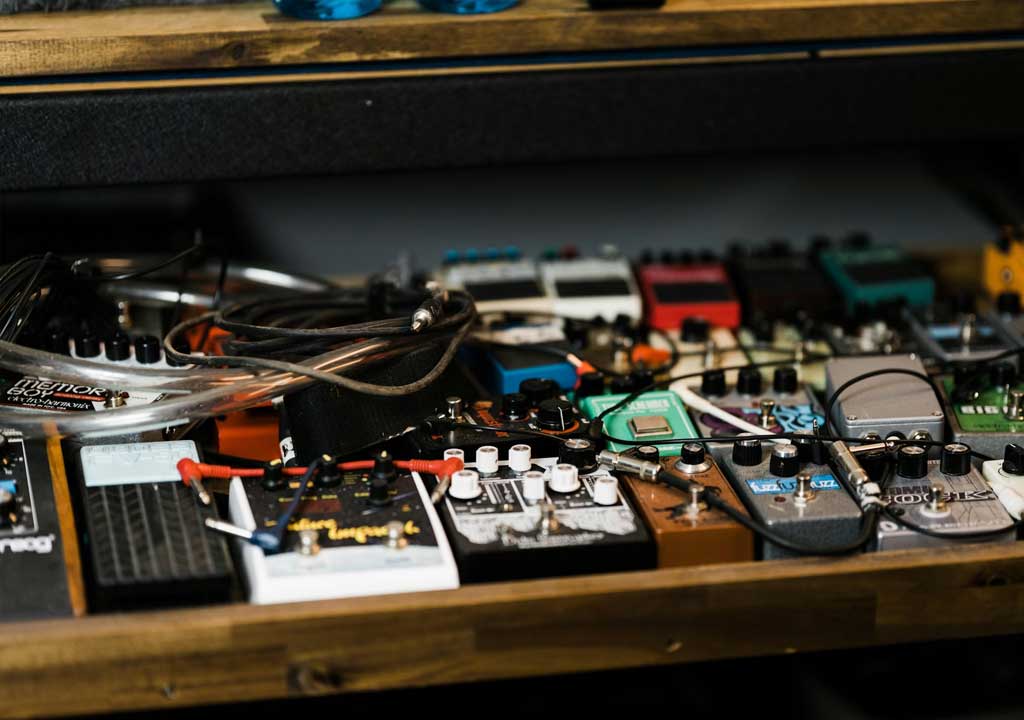
Organize the layout so that power cables and signal cables take different routes, minimizing interference and avoiding accidental unplugging during performance. Use color-coded or labeled cables to quickly identify signal paths. Implement proper strain relief at every pedal-use zip ties, Velcro ties, or dedicated cable clamps to secure cables to the board and prevent tugging. Route cables to minimize tension on jacks and to reduce the chance of a pedal tipping and pulling on a connector. A tidy, well‑relieved system reduces wear on connectors, maintains signal integrity, and makes troubleshooting faster when something goes wrong.
4. Power Supply Health: Isolated, Well-ventilated, and Within Specs
Power supplies are the lifeblood of a pedal board. A failing or undersized supply can cause noise, intermittent operation, or damage to pedals. Start with a quick assessment: check that your power supply is appropriate for the total current draw of your pedal lineup, and ensure it has isolated outputs if you're running multiple pedals that draw from different grounds. Isolated outputs reduce ground loops and noise. Keep the power bricks well-ventilated; heat accelerates component wear and can shorten the life of capacitors and regulators.
Regularly inspect power cables for signs of wear, frayed insulation, or blistering near the connectors. If you use daisy-chaining, reconsider in favor of dedicated isolated outputs, especially with high‑current or low‑voltage pedals like digital delays or power-hungry fuzz pedals. Check the polarity of DC adapters on a few pedals; some older units require a specific orientation, and a mismatch can damage sensitive components. For LED indicators, watch for dimming or flickering lights as a sign of power instability. Document any changes in the power scheme so you can revert if trouble arises during a gig.
5. Velcro, Mounts, and Pedal Retention: Keeping It Secure
Velcro is a beloved ally for quick changes, but it wears out. The hooks on a velcro strip can snag on dust, causing pedals to lift gradually or detach during a performance. Periodically inspect the adhesive side and the hook side for wear. If you notice reduced grip, replace the worn Velcro; friction is the enemy of stable tone. Consider investing in high-quality, dual‑sided Velcro that's designed for the weight and footprint of your pedals. When you remove pedals for cleaning or upgrades, inspect the surface of the pedal and the board-the adhesive can leave residue that weakens future holds.
Mounting hardware should be checked as well. Screws should be snug but not over-tightened, which can strip threads or damage the pedal's chassis. If you use rubber feet or spacers to dampen vibration, inspect them for cracking or compression. For a more robust approach, some players use hardware-based pedal retention systems or semi-permanent mounting solutions in high‑duty configurations. The goal is secure, repeatable placements that don't introduce rattling or wobble during footwork.
6. Board Surface, Case, and Environmental Protection
The physical integrity of the board and its case speaks to longevity. Wooden boards can warp with humidity changes, while aluminum boards may dent with heavy use. Inspect for warping, loose joints, or cracked edges, and address any structural concerns promptly. If you carry your board in a case or gig bag, check the case latches and padding for wear. A well-padded case reduces impact damage and keeps connectors aligned even on rough transport.
Environmental protection is part of board maintenance. Use a protective mat on top of the board to dampen foot noise and reduce wear on the pedal faces. Keep the board away from direct heat sources like radiators, heaters, or sunny windows. Temperature fluctuations and humidity changes can degrade rubber components, adhesives, and plastics, leading to premature aging. When storing the board, select a dry, climate-controlled space and avoid basement-level moisture blankets. A little care during storage pays big dividends in reliability and tone fidelity over time.
7. Dust, Moisture, and Temperature: The Environmental Pillars
Uncontrolled dust and humidity are silent accelerants of wear. In humid environments, metal jacks and connectors can corrode faster, while dust acts as an abrasive in close-fitting contact areas. Regularly dust the underside of the board and the interstitial spaces between pedals. If you gig in smoky or dusty venues, consider a protective cover or travel case that helps keep grime away between sets. During long studio sessions, keep humidity in the comfortable range for electronics (roughly 40-60%). A dehumidifier in damp environments can prevent rust on jacks and chassis screws.
Temperature matters too. Most pedals and power supplies are rated for operation in a wide range, but sustained high temperatures shorten the life of seals, capacitors, and solder joints. Avoid stacking the board on top of hot amplifiers or near heaters. If your space runs hot, provide airflow around the power supply and consider a small, quiet cooling fan or a vented rack to maintain temperatures closer to room temperature. Stability matters; aim for a consistent environment rather than a perfect one-time setup.
8. Jacks, Sockets, and Connector Care: Gentle Handling
Jacks and sockets are the points where signal integrity meets mechanical wear. Frequent plugging and unplugging, as well as rough insertion, can wear the contacts, causing crackling and intermittent connection. Treat jack tips and plug barrels gently: avoid bending or twisting patches during insertion, and don't yank cables out by the cable itself. For older or high‑cycle pedals, inspect the tip and barrel for nicks and wear; if you notice a looser fit or audible crackling, replace the patch or the entire pedal cable.
When cleaning, avoid applying cleaners directly into sockets. If corrosion appears, use a gentle contact cleaner designed for electronics with the tip of a microfiber swab and avoid applying excessive solvent. For jacks that accumulate grime inside their coupling area, consider a professional cleaning or, if feasible, replacement of the jack module. A clean, snug, well-lubricated connector maintains signal quality and reduces the risk of failed connections during performances.
9. Footswitch Longevity: Recording Clicks and Reducing Wear
Footswitches endure the most tactile interaction on a pedal board. A stiff or sticky switch can indicate dirt, worn bearings, or lubrication that's dried up. Schedule periodic inspection of the switches: press with a calm, even pressure and listen for smooth, consistent feedback. If you hear crackling, resistance, or a "dead" click, address it promptly. A small amount of electronics-safe lubricant on the pivot points can help, but avoid over‑lubrication-dust and grime will cling to it and worsen problems. In extreme cases, replacement switches or even whole pedals may be more cost-effective than ongoing repairs.
Preventive steps include avoiding slamming switches, ensuring pedal position is stable on the board, and using a rigid, non-slip pad beneath each pedal to minimize movement during performance. If you use expression pedals or volume pedals, verify that their movement is evenly staged and that pot ramps aren't binding. By treating the footswitch as a moving mechanical component that requires periodic care, you extend both its life and the consistency of your control over your tone.
10. Battery Management: If You Still Use Batteries
Many pedals still rely on batteries or include internal battery compartments. Batteries bring their own set of maintenance challenges: leakage, corrosion, and reduced life impact the pedal's performance. If your pedal uses a 9V battery or a rechargeable option, inspect the battery compartment for corrosion and residue after removal. Replace batteries promptly if you notice any leakage or swelling. Consider switching to a power supply with reliable DC outputs to minimize battery dependency, especially for pedals that don't require batteries for active power in your rig.
When keeping batteries as backups, store them in a cool, dry place and rotate your stock to ensure you're using the oldest ones first. Remove batteries from pedals when not in use for extended periods to prevent leakage and corrosion. If you're using battery-powered pedals in a pedalboard with a centralized power supply, ensure that the power supply supports the required current without forcing batteries to compensate for insufficient power delivery. Proper management reduces corrosion risk and extends the life of both the pedal and its internal power infrastructure.
11. Troubleshooting: Common Symptoms and Quick Fixes
Even with a solid routine, occasional issues will arise. A systematic approach to troubleshooting saves time and protects the board's longevity. Common symptoms include crackling sounds, intermittent on/off behavior, or sudden volume drops. Start with the simplest culprits: swap out one cable at a time to identify a bad patch, test pedals individually outside the board to confirm operation, and inspect the power supply for overheating or flickering LEDs. Document which pedal and cable configuration you used when the issue appeared; this makes future troubleshooting faster and reduces unnecessary wear through random cable swaps.
Electrical issues can also come from grounding problems or power supply interactions. If you hear hum or buzz, recheck that the power supply is isolated per output and that there is no ground loop created by sharing signal and power grounds in a way that's not intended. In some cases, simply re-seating plugs and re-dressing cables can restore proper contact. If persistent issues occur, consider swapping out a suspect component on a temporary basis to confirm the root cause before committing to a repair or replacement.
12. Documentation and Record Keeping
One of the most practical things you can do for long-term board health is to keep a maintenance log. Record dates of cleaning, cable replacements, Velcro refreshes, and power supply checks. Note the model numbers and serials of pedals and power bricks. This becomes invaluable when you're planning upgrades, diagnosing recurring issues, or dealing with warranty claims. A simple notebook, spreadsheet, or dedicated maintenance app can serve as your single source of truth for what you did, when you did it, and why.
Include photos of the board setup after changes and a quick inventory of spare parts. Recording the life cycle of components helps you budget replacements and anticipates wear cycles. When you follow a routine and document it, you'll notice patterns-like a specific patch cable that consistently wears quickly, or a pedal that tends to introduce noise after a certain number of gigs. Knowledge is power, and a well-kept log keeps your pedal board running smoothly for years.
13. Upgrades and Future-Proofing
Maintenance isn't just about keeping things working; it's also about planning for better reliability and easier upkeep in the future. Regularly assess whether your power supply, patch cables, or board surface still meet the demands of your rig. If you add more pedals or switch to digitally complex effects, you may need to upgrade to a higher-current, better-regulated power supply to prevent noise and voltage droop. Consider modular mounting options that let you swap pedals without altering the entire layout. A future-proofed board reduces downtime and simplifies repairs as your rig evolves.
Physical upgrades can also help longevity. A lighter, rigid pedalboard material with protective coatings resists warping and cosmetic wear. If your board is frequently transported, invest in a case with better padding and a shock-absorbing base. Consider high-quality connectors and cables that tolerate frequent plugging and unplugging. By anticipating future needs and upgrading progressively, you preserve performance quality while reducing the risk of sudden, costly failures.
14. Seasonal Deep Dives: Annual Servicing
Seasonal servicing-an annual or semi-annual deep dive-helps catch issues that don't show up in day-to-day checks. Schedule a comprehensive inspection that covers all pedals, jacks, and the power setup. Open the pedal compartments if safe and visually inspect solder joints and cable routing for signs of fatigue or heat damage. This is a good time to re-secure Velcro surfaces, replace worn footswitch pads, and refresh any adhesive surfaces that have aged.
Evaluate environmental exposure from the past year. If you toured in different climates, you may need to re-lubricate mechanical parts, reseat pot shafts, and inspect knobs for smooth operation. Check the board's mounting hardware for looseness or rust. Seasonal servicing is also the moment to verify your spare parts stock, such as extra cables, connectors, Velcro strips, and fuses if your power supply uses replaceable fuses. A thorough annual check keeps small issues from turning into major outages during peak playing seasons.
15. Conclusion: Build a Habit, Preserve Your Tone
Regular maintenance is not a luxury for pedal-board enthusiasts; it's a practical responsibility. By integrating visual inspections, cleaning routines, cable management, power-supply health, and environmental awareness into your workflow, you safeguard your tone and extend the life of every component on your board. The goal is reliability and clarity of signal from the first pedal to the final effect in your chain.
Remember that consistency beats intensity when it comes to upkeep. A short, daily check; a brief weekly clean; a longer monthly review; and a yearly deep dive will save you time, money, and stress. Document what you did, what you changed, and what you observed. With a well-maintained pedal board, you'll enjoy dependable performances, predictable tones, and a setup that ages gracefully along with your playing.
LIKED THIS ARTICLE? SHARE IT: